



About wallet registration[Updated 2026/3/30]
Thank you for always playing Lucky Farmer.
We would like to provide information regarding wallet registration.
In Lucky Farmer, an external wallet (such as MetaMask) is required in order to receive rewards. Please prepare an external wallet in advance.
■ For Smart Wallet Users
Currently, the wallet registration function of our service does not support smart wallets.
If you are using smart wallet features with wallets such as Coinbase Wallet, address registration cannot be completed because signature verification during wallet connection will not succeed.
In such cases, please use a standard wallet such as MetaMask, or a regular account (EOA) within your wallet.
Please note that there are currently no plans to support smart wallets.
Below are the instructions on how to register your external wallet in the game.
■Wallet Registration
Tap the Wallet icon on the main screen of the game to open the reward dialog.
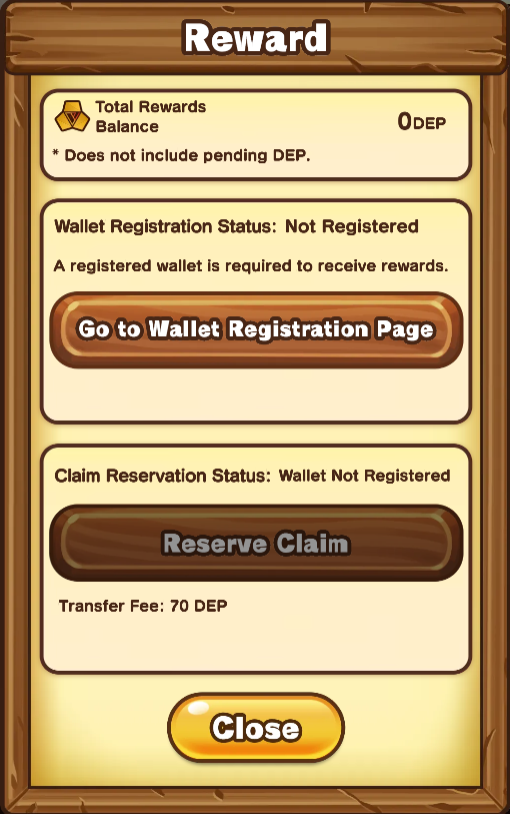
Tap the “Go to Wallet Address Registration Page” button. A confirmation dialog will appear.
If everything is correct, please press the “OK” button.
An external page will open. Please connect the external wallet you prepared.
After confirming the details, sign the request to complete the registration.
Once the registration is completed and you return to the game, a “Registration Complete” dialog will appear.
This completes the wallet registration process.
To send rewards to the registered wallet, you will need to use the Claim Reservation feature, which is scheduled to be implemented at a later date.
Until then, the DEP you earn will be recorded within the game, and you can check it in the Total Reward Balance section of the reward dialog.
*The expected DEP earned in the previous week will be reflected after the weekly calculation is completed.
*The calculation process may take approximately 2 to 5 days.
*Transaction fees will be required when sending rewards to the registered wallet.
[Updated 2026/3/30]
■ Making a Claim Reservation
Once your wallet is registered and your total accumulated reward balance exceeds the transfer fee, the "Make a Claim Reservation" button will become active.
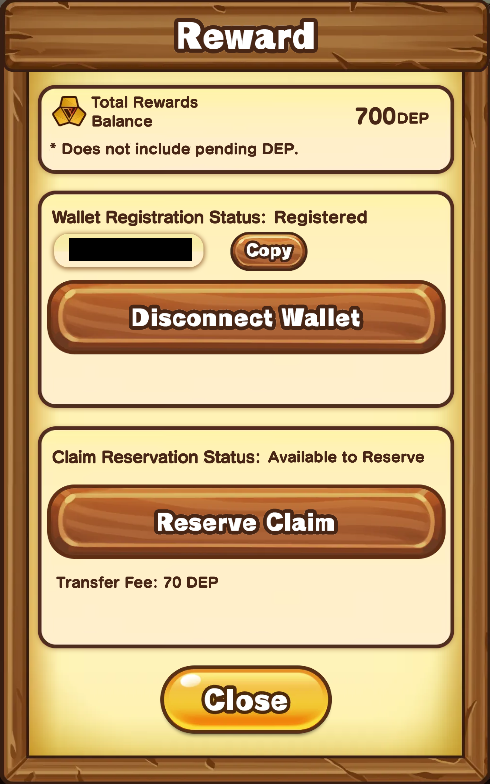
When you tap the “Make a Claim Reservation” button, a confirmation dialog will appear.
If everything is correct, please tap the “OK” button.
The process is complete once the “Reservation Completed” dialog appears and the Claim reservation status changes to “Reserved.”
- Note that rewards are not transferred at this point.
■ Regarding the Distribution Period
No special action is required on the user’s part.
The reward distribution period begins every Monday at 9:00 (JST) when the week rolls over.
During this period, you cannot make Claim reservations, nor can you register or unregister a wallet.
Once the distribution process is finished, funds will be transferred to your registered wallet sequentially.
■ Rewards are transferred
Rewards will be automatically sent to the wallets of users who have requested a claim by the end of the distribution period.
After the transfer, the cumulative reward balance will become 0.
The amount sent to the wallet will be the sum of the “cumulative reward balance” and the “DEP scheduled to be earned in the week for which the claim was reserved,” minus the transfer fee.
Thank you for your continued support of Lucky Farmer.